
KDS
Kitchen Display System
Streamline kitchen workflows with instant order routing. Orders confirmed on POS appear on any Android screen with audible alerts.
Streamlined Kitchen Operations
Transform your kitchen workflow with digital order management
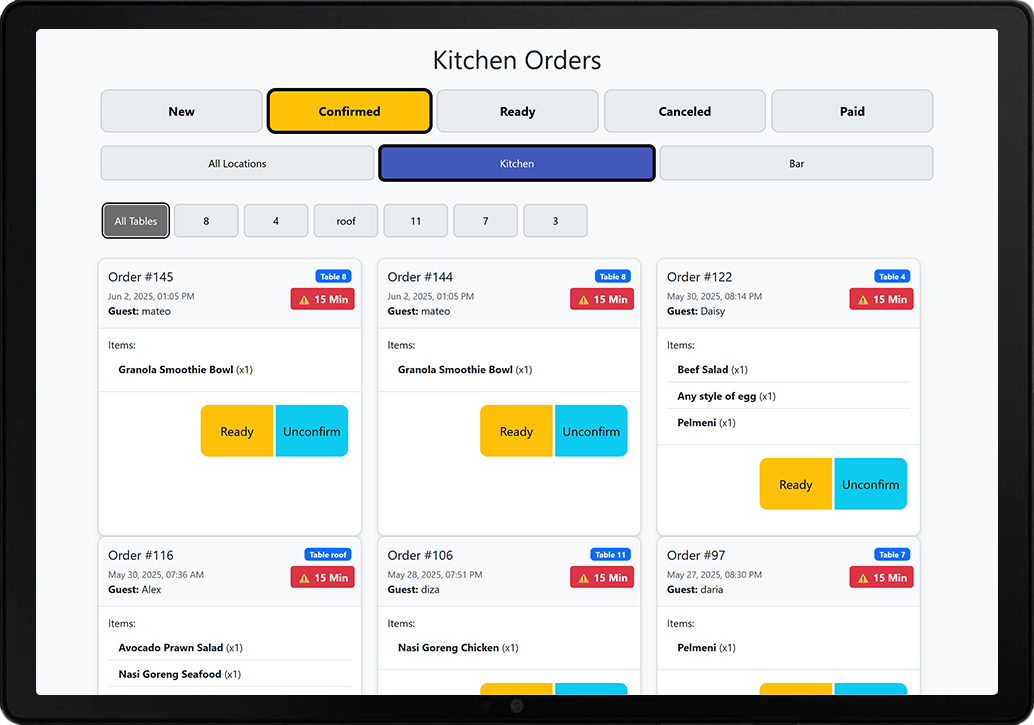
Instant Order Routing
Orders from POS, QR menus, and website appear instantly on kitchen screens
Audio & Visual Alerts
Customizable sound notifications and visual cues for new orders
One-Tap Updates
Mark items as ready with a single tap, instantly notifying servers
Real-time Sync
All devices stay synchronized with live order status updates
Order Timing
Track preparation times and optimize kitchen workflow
Multi-Station Support
Support multiple kitchen stations with customized order filtering
How It Works
Simple workflow that eliminates kitchen chaos
Order Received
New orders from POS, QR menu, or website automatically appear on kitchen display
Audio Alert
Customizable sound notification alerts kitchen staff of new orders
Preparation
Kitchen staff can see all order details, special requests, and timing
Ready Status
One tap marks items as ready, instantly notifying servers and updating POS
Eliminate Kitchen Chaos
Say goodbye to lost tickets, miscommunication, and kitchen stress. Our Kitchen Display System ensures every order is clearly visible, properly timed, and efficiently managed from start to finish.
- Eliminate paper tickets and reduce order confusion
- Improve kitchen-to-server communication by 95%
- Reduce average order preparation time
- Works on any Android tablet or phone
- Customizable alerts for different order types
- Real-time order status visible to front-of-house
Seamless Integration
Works perfectly with all Teia services and existing systems
POS Integration
Orders from Teia POS appear instantly on kitchen displays with all details and modifications.
QR Menu Orders
Guest orders from QR menus route directly to kitchen with special requests and preferences.
Online Orders
Website orders automatically appear with pickup/delivery times and customer information.
Get Started with Kitchen Display
Ready to eliminate kitchen chaos? Let's discuss your specific needs.